Most Shopify analytics apps solve one problem well but leave operators combining separate tools manually
Most Shopify analytics apps specialize in one category (attribution, profit tracking, or behavior analysis), which means store owners end up managing three tools to get one complete picture. Shopify's built-in reports tell you what happened yesterday. They do not explain why your conversion rate dropped or which ad campaign drove last week's revenue spike.
A growing ecosystem of third-party analytics tools has emerged to fill reporting gaps, but you still end up with an attribution tool here, a cohort analysis dashboard there, and a spreadsheet holding everything together. Some platforms address the fragmentation problem directly. Triple Whale offers 60+ integrations and Polar Analytics connects 40+ connectors. Choosing between them depends on your store's size, budget, and technical comfort.
We evaluated each app on data accuracy, ease of setup, integration breadth, and value relative to price. Every recommendation below includes specific strengths and honest limitations so you can match the right tool to your operation.
Key takeaways
- AnalysisGPT pulls data from multiple sources and lets you ask questions in plain English, turning raw numbers into clear answers.
- Triple Whale centralizes ad attribution so you can see which campaigns drive revenue.
- BeProfit focuses on profit tracking, factoring in hidden costs that eat into margins.
- Category diversity matters. No single app covers attribution, profitability, and conversational analysis equally well.
- AI-powered analytics are maturing fast. Tools that once required manual report building now surface insights automatically.
- "AI analytics" means different things here. AnalysisGPT uses AI as the primary question-and-answer interface, Polar layers AI onto unified ecommerce reporting, and Lebesgue applies AI to marketing optimization.
Key takeaways
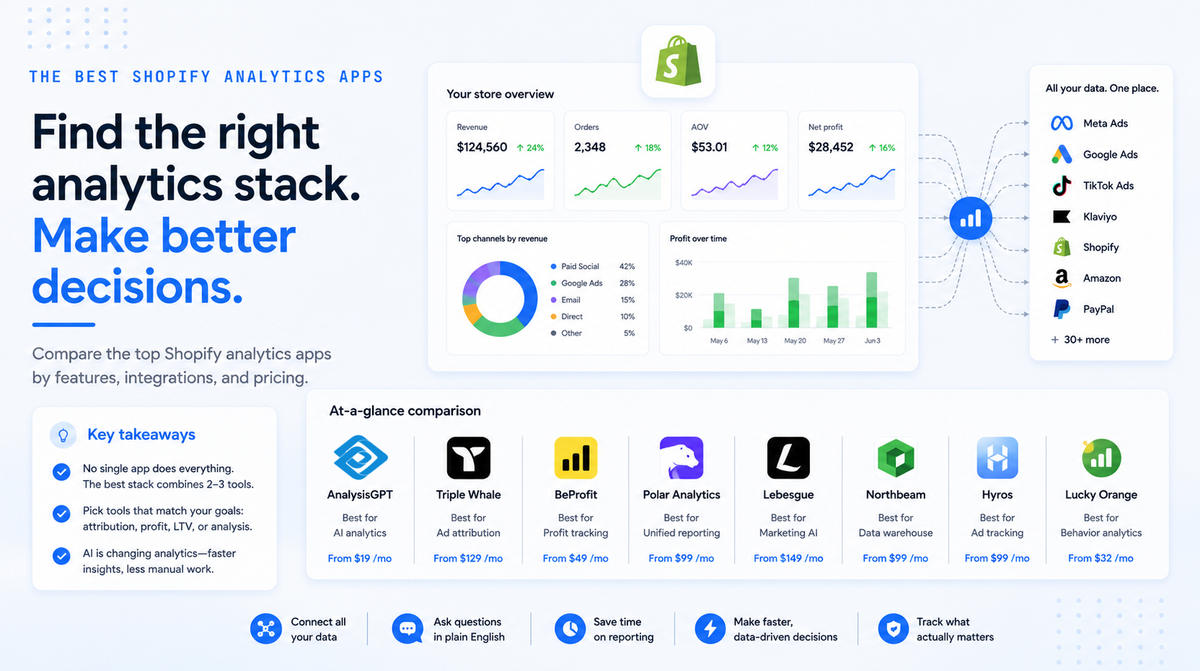
Choosing the right Shopify analytics app depends on the questions you need answered and how your business measures success. No single tool covers every analytics category equally well, and the strongest stack for most stores combines two or three purpose-built apps.
- AnalysisGPT pulls data from multiple sources and lets you ask questions in plain English, turning raw numbers into clear answers.
- Triple Whale centralizes ad attribution so you can see which campaigns drive revenue.
- BeProfit focuses on profit tracking, factoring in hidden costs that eat into margins.
- Category diversity matters: No single app covers attribution, profitability, and conversational analysis equally well.
- AI-powered analytics are maturing fast: Tools that once required manual report building now surface insights automatically.
- "AI analytics" means different things here: AnalysisGPT uses AI as the primary question-and-answer interface, Polar layers AI onto unified ecommerce reporting, and Lebesgue applies AI to marketing optimization.
At-a-glance comparison
Choosing between Shopify analytics apps comes down to what you need to measure. Some tools focus on ad attribution, others on profit tracking or customer lifetime value. Eight leading options are compared below by use case, price, integrations, ease of use, and main limitation so you can narrow the field fast.
What to look for in a Shopify analytics app
The right Shopify analytics app connects to all your data sources, works without a technical operator, and stays affordable as your order volume grows. Most apps look similar on their feature pages. The differences show up after you install them and try to answer a real question about your business. The criteria below help you evaluate what matters for your store's size, team, and budget.
Does it connect to the data you use?
Your Shopify admin shows orders, sessions, and conversion rates. It does not show what you spent on Meta ads last Tuesday or which Klaviyo flow drove the most repeat purchases. A useful analytics app pulls data from ad platforms, email tools, accounting software, and Shopify itself into one place. Look for native integrations with Google Ads, Meta, Klaviyo, QuickBooks, and any other tools in your stack. Avoid apps that only reformat your Shopify dashboard data without adding cross-source analysis. An app that leaves you opening five tabs adds a tool without solving the original problem.
Can a non-technical person get answers without help?
Non-technical team members need a tool that returns answers from plain-English questions quickly. Some tools let you type a question and get a chart back without waiting. Others require you to build dashboards from scratch, dragging metrics onto a canvas before you see a single number. Pre-built report templates fall somewhere in between. Consider who on your team will use the app daily. If that person cannot write a SQL query, skip anything that assumes they can. Time-to-insight matters more than feature count. A tool your marketing manager ignores is worse than a simpler one they check before lunch.
What does it cost at your scale?
Most Shopify analytics apps offer a free or low-cost entry point. Pricing pages rarely tell you what happens when your store processes 10,000 orders a month instead of 500. Some apps charge per feature, locking reports behind higher plans. Others use usage-based tiers where costs rise with your order volume or the number of data sources you connect. Before you commit, calculate total cost at your current volume and at double that volume. Ask whether analytics features are bundled or sold separately. A $29/month starting price can become $199/month once you add the integrations and historical data access you need.
Why time-to-decision matters more than dashboard count
Time-to-decision matters more than dashboard count because operators need answers they can act on, not raw numbers to interpret. The best Shopify analytics apps close that gap by turning raw numbers into plain-language insights or actionable recommendations. Throughout this guide, we prioritize tools that help store owners reach a decision faster, whether through natural language queries, automated anomaly detection, or structured profit breakdowns. If an app requires a data analyst to interpret its output, it scores lower on our evaluation regardless of how many features it offers. The goal is fewer open tabs and faster decisions.
How we evaluated these tools
AnalysisGPT is our platform, and it appears first because this guide evaluates Shopify analytics apps through the lens of non-technical store owners who need answers from their data without a dedicated analyst. The remaining tools are assessed using public product documentation, current pricing pages where available, Shopify App Store listings, and usefulness for small teams.
Each app was scored on four criteria: data-source fit, ease of use for non-technical users, cross-source capability, and verified pricing.
1. AnalysisGPT
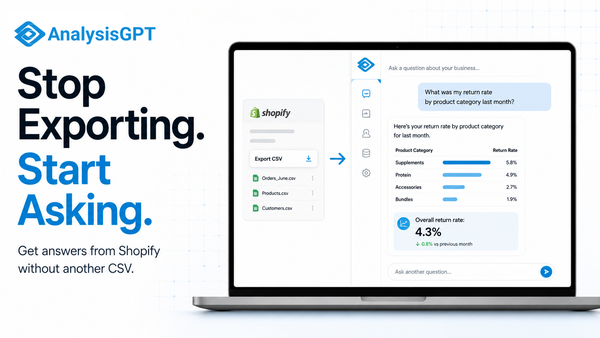
AnalysisGPT is a conversational analytics platform for non-technical Shopify operators who want business answers from their data without SQL, dashboards, or a dedicated analyst. If your analytics needs stretch beyond Shopify into spreadsheets or databases, this tool pulls answers from all of them in a single conversation.
Who it works for: Non-technical Shopify store owners who need cross-source business answers without SQL, dashboards, or a data team.
Best for: Cross-source conversational analytics.
Why it belongs on this list: AnalysisGPT connects to Shopify, databases, and Excel/CSV files, letting store operators type questions in plain English and get answers that span multiple data sources in one workflow. For lean teams juggling Shopify data alongside inventory spreadsheets or a separate database, AnalysisGPT removes the need to export, merge, and manually analyze across systems.
The main business question this tool answers: "What is driving my revenue and margins across all my sales channels and data sources?"
Key features:
- Shopify connector for store data queries
- Plain-English queries across connected sources, no SQL needed
- Cross-source analysis combining Shopify, database, and file data
- Data security architecture: The LLM sees only column fields and table metadata, the LLM formats the query, read-only access executes the query, and user data stays in the customer's systems.
- Compliance: AnalysisGPT is ISO 27001, ISO 42001, SOC 2 Type II, GDPR, and UK Cyber Essential compliant.
Choose this if: You run a lean team, your data lives in Shopify plus other systems, and you want business answers in plain English without building dashboards.
Skip this if: You need pixel-based ad attribution with conversion tracking, enterprise-scale business intelligence with custom data warehousing, or a Shopify-native app that runs entirely inside the Shopify admin. AnalysisGPT does not include an attribution pixel.
Pricing: Trial at £0, Excel plan at £20 billed every 30 days, Pro plan at £90 billed every 30 days, Enterprise custom.
2. Triple Whale
Server-side attribution tracking sets Triple Whale apart for ad-heavy Shopify stores. The platform's Triple Pixel captures conversions that browser-based pixels miss due to iOS privacy restrictions and ad blockers, giving DTC brands a clearer picture of which campaigns drive revenue. A consolidated dashboard pulls spend data from Meta, Google, TikTok, and 60+ integrations into one view.
Who it works for: DTC Shopify brands spending on paid advertising who need accurate attribution data.
Best for: Server-side ad attribution and profit tracking.
Why it belongs on this list: Triple Whale solves a specific, expensive problem: ad dollars wasted on campaigns that look profitable in platform dashboards but fall apart once you account for all costs. Its server-side tracking bypasses the signal loss that plagues browser-based pixels, and real-time profit-and-loss reporting connects ad spend directly to margin.
The main business question this tool answers: "Which ad campaigns are profitable after I account for all my costs?"
Key features:
- Server-side attribution tracking via Triple Pixel
- Consolidated ad spend dashboard across Meta, Google, and TikTok
- Real-time profit and loss tracking
- Creative performance analytics
- Shopify-native integration with 60+ integrations
Choose this if: You spend significantly on paid ads across multiple platforms and need attribution data that survives iOS privacy changes and ad-blocker interference. The platform delivers the most value when paid channels represent a major share of your revenue.
Skip this if: Your store relies primarily on organic traffic, word-of-mouth, or marketplace sales. Attribution tracking has limited payoff when paid advertising is not a core growth channel.
Pricing: Free plan at $0/mo with Triple Pixel tracking, first/last-click attribution, and up to 10 users. Starter at $179/mo adds multi-touch attribution and 60+ integrations. Advanced at $259/mo includes subscription data and cohort analysis. Custom at $539/mo for brands at $20M+ annual GMV. Pricing scales with GMV; check the Triple Whale pricing page for current rates at your revenue tier.
3. Polar Analytics
Polar Analytics delivers the most value for larger DTC brands managing complex, multi-channel operations.
Polar Analytics pulls data from Shopify, ad platforms, email tools, and 40+ other connectors into one unified dashboard, then layers AI on top to surface insights and answer questions in plain language. It suits multi-channel DTC brands that want all their marketing data unified in one place.
Who it works for: Multi-channel DTC brands that want unified analytics with AI-powered insights.
Best for: AI-powered channel unification and natural language queries.
Why it belongs on this list: Running ads on Meta, Google, TikTok, and email simultaneously creates data silos. Polar Analytics eliminates those silos by automating data unification across every channel, then uses AI to detect anomalies and generate actionable insights without manual digging. Natural language querying lets operators ask business questions directly rather than building custom reports.
The main business question this tool answers: "How are all my marketing channels performing together, and where should I shift budget?"
Key features:
- Automated data unification across Shopify, ad platforms, and email with 40+ connectors
- AI-powered anomaly detection and insights
- Natural language querying for instant answers
- LTV, return on ad spend (ROAS), and profit and loss (P&L) reporting
- Pre-built and customizable dashboards
Choose this if: You run ads across multiple platforms and email campaigns, and you want a single unified view with AI-generated insights. Evaluate this option if your store generates enough revenue to justify the investment, as it delivers the most value for brands managing complex, multi-channel marketing operations.
Skip this if: You run a smaller store with one or two marketing channels. Polar uses premium, GMV-tiered pricing (Polar Analytics pricing), so the price point may not match your revenue scale. Brands at lower GMV tiers should weigh the cost carefully against simpler, lower-priced alternatives.
Pricing: Pricing is GMV-tiered and varies by product bundle; verify current rates with Polar. No free tier. All plans include a dedicated Snowflake database and unlimited users (Polar Analytics pricing).
4. BeProfit
BeProfit tracks true profit on every Shopify order by pulling in cost of goods sold (COGS), ad spend, shipping costs, and marketplace fees automatically. Store owners see real margins at the product and order level without maintaining external spreadsheets. It answers a single question clearly: what did you earn after every expense?
Who it works for: Shopify store owners who need clear profit margins after accounting for all expenses.
Best for: True profit analytics after COGS, ad spend, shipping, and fees.
Why it belongs on this list: BeProfit consolidates every expense line into one profit dashboard, replacing the spreadsheet operators typically maintain. Product-level and order-level breakdowns surface margin problems that aggregate reporting hides.
The main business question this tool answers: "What's my real profit after every expense, for each product and each order?"
Key features:
- Automated COGS and expense tracking
- Product-level and order-level profit breakdowns
- Multi-store support
- Shipping cost analysis
- Ad spend integration across platforms
Choose this if: You sell physical products on Shopify and your biggest gap is true margins after all costs.
Skip this if: Your margins are straightforward (digital products, few expense lines) or you need attribution data more than profit data.
Pricing: Published pricing shows Basic from $49/mo, scaling by order volume to $249/mo for unlimited orders (BeProfit pricing). No permanent free tier; free trial available. Verify current rates on the BeProfit website.
5. Lifetimely by AMP
Lifetimely projects customer lifetime value by acquisition source, helping repeat-purchase Shopify stores identify which marketing channels bring buyers who come back and spend more over time. It breaks down LTV by cohort and source so operators can allocate budget toward the channels that build long-term customer value.
Who it works for: Subscription boxes, consumable products, and any Shopify store where repeat purchases drive revenue.
Best for: Customer LTV projections and cohort analysis.
Why it belongs on this list: Lifetimely answers a question most Shopify analytics apps skip: which acquisition channels bring customers who spend more over time? Its predictive models break down LTV by source, giving operators a forward-looking view of customer economics.
The main business question this tool answers: "Which acquisition channels bring customers who come back and spend more over time?"
Key features:
- Predictive LTV modeling by acquisition channel: Projected customer value segmented by traffic source
- Cohort analysis and retention tracking: Monitor how customer groups behave over months
- Revenue forecasting: Plan inventory and cash flow from projected repeat-purchase patterns
- P&L reporting with customer acquisition cost (CAC) payback periods: Tie acquisition costs to long-term value in one view
- Shopify-native with marketing integrations: Pulls data from ad and email platforms alongside Shopify
Choose this if: You sell subscriptions, consumables, or anything with strong repeat-purchase patterns.
Skip this if: Your product is a one-time purchase with low repeat rates.
Pricing: Free at $0/mo for up to 50 orders with all features (Lifetimely pricing). Paid plans from $149/mo (3,000 orders) to $999/mo (unlimited). Now part of the AMP suite alongside Back in Stock, Slide Cart, and Bundles.
6. Lucky Orange
Lucky Orange shows exactly how visitors interact with your Shopify store through heatmaps, session recordings, and real-time dashboards. Store owners see every click, scroll, and hesitation, replacing guesswork about conversion drop-offs with visual evidence they can act on the same day.
Who it works for: Shopify store owners optimizing conversion rates through behavior analytics.
Best for: Heatmaps, session recordings, and real-time visitor behavior tracking.
Why it belongs on this list: Session recordings and heatmaps show exactly where shoppers click, scroll, and abandon, giving you visual evidence to fix conversion bottlenecks costing you revenue.
The main business question this tool answers: "Where are visitors dropping off in my store, and why aren't they buying?"
Key features:
- Dynamic heatmaps that update as your pages change
- Session recordings with filtering by device, location, and behavior
- Real-time visitor dashboard showing live activity
- Form analytics for checkout optimization
- Native Shopify App Store integration
Choose this if: You have steady traffic but your conversion rate is underperforming, and you need visual evidence to diagnose why.
Skip this if: Your primary analytics need is financial reporting rather than behavioral insight, or your store traffic is too low to generate meaningful patterns.
Pricing: Build plan at $39/mo for 3,500 sessions (Lucky Orange pricing). Expand plan at $249/mo for 50,000 sessions. Scale plan at $1,049/mo for 300,000 sessions. No permanent free tier.
7. Better Reports
Better Reports fills the gap between Shopify's limited built-in reports and full business intelligence platforms. It lets operators build granular custom reports using a drag-and-drop visual builder, schedule automated delivery, and export in multiple formats. With a 5.0 rating across more than 1,100 reviews on the Shopify App Store, it consistently ranks among the highest-rated analytics tools for Shopify.
Who it works for: Shopify store owners who need custom, scheduled reports beyond what Shopify provides natively.
Best for: Custom Shopify report building with scheduling and export.
Why it belongs on this list: Better Reports lets operators build the exact report they need using a visual builder, then schedule it for automatic delivery. For stores that outgrow Shopify's native reporting but do not need a full business intelligence platform, it fills the gap with 100+ built-in reports and flexible export options.
The main business question this tool answers: "Can I get a weekly report on exactly the metrics I care about, delivered to my inbox without manual work?"
Key features:
- Custom report builder with drag-and-drop fields
- Scheduled report delivery via email
- Export to CSV, Excel, PDF, and Google Sheets
- 100+ pre-built report templates
- Multi-store reporting
Choose this if: You need specific recurring reports that Shopify's built-in analytics cannot generate.
Skip this if: Your priority is real-time analytics, AI-powered insights, or cross-platform data unification, which are not part of Better Reports' documented feature set.
Pricing: Starts at $19.90/mo on the Basic Shopify plan, scaling to $39.90/mo (Grow), $149.90/mo (Advanced), and $299.90/mo (Plus) (Better Reports pricing). Pricing is tied to Shopify plan tier, not usage. All tiers include the same features. 14-day free trial available.
8. Lebesgue AI CMO
Lebesgue AI CMO aggregates marketing performance data from Meta, Google, TikTok, and Klaviyo, then uses AI to surface optimization recommendations operators can act on without a marketing analyst. It is the strongest fit for Shopify merchants who run paid ads across multiple platforms and need AI-driven budget guidance in one dashboard.
Who it works for: Shopify store owners managing ad spend across Meta, Google, TikTok, and email who want AI-driven marketing optimization.
Best for: AI marketing analytics and cross-channel ad performance optimization.
Why it belongs on this list: Lebesgue pulls marketing data from every major ad platform and email tool, then uses AI to flag what is working and what is burning budget. A single dashboard consolidates performance insights with concrete recommendations for budget reallocation.
The main business question this tool answers: "Where should I increase or decrease my ad budget based on what is working across all my channels?"
Key features:
- Cross-channel marketing analytics (Meta, Google, TikTok, Klaviyo)
- AI-powered recommendations and benchmarking
- Competitor ad monitoring
- LTV and cohort analysis
- Profitability tracking per marketing channel
Choose this if: You spend on paid ads across multiple platforms and want AI-generated budget recommendations.
Skip this if: Your marketing is primarily organic and you do not manage significant paid ad spend.
Pricing: Free at $0/mo covering profit tracking, ad analytics, and automated audits (Lebesgue pricing). Ultimate at $79/mo adds LTV, competitor intelligence, and limited Henri AI. Ultimate AI at $149/mo adds unlimited Henri AI and AI visibility. Attribution pixel (Le Pixel) is priced separately and uses revenue-based tiers; check the Lebesgue pricing page for current rates.
How to choose the right Shopify analytics app
The right analytics app depends on the biggest gap in your current reporting. Feature count is a poor guide. Start by identifying the single question your current dashboard cannot answer. A store losing money on Facebook ads should start with attribution clarity. A store with strong traffic but weak conversions should start with behavior diagnostics. Pick the tool that fills your most urgent data gap first, then expand your stack as revenue and complexity grow.
Match the tool to your biggest data gap
Use this decision matrix to find your starting point based on the specific problem you need to solve right now.
The "Add later when" column signals the natural expansion trigger for each tool. You will not need to revisit this decision from scratch. Watch for the signal that tells you it is time to layer in the next tool.
Start with one tool and layer as you grow
Install one app this week. Run it for 30 days before adding anything else. Stacking multiple analytics tools at once creates duplicate data, conflicting metrics, and decision paralysis.
Begin with your core gap from the matrix above. Once that tool runs smoothly, add a profit-tracking layer (BeProfit or Lifetimely) so you see real margins alongside performance data. Only then consider a behavior tool like Lucky Orange to diagnose specific friction points your numbers reveal.
Each layer should answer a question the previous layer surfaced. Attribution identifies winning channels, and profit tools confirm whether those channels generate real margins. Build your stack one question at a time.
Frequently asked questions
Shopify's built-in analytics cover the basics, but most store owners need a third-party app as soon as they run paid ads or track profit beyond what Shopify reports natively.
Does Shopify have built-in analytics?
Yes. Shopify provides sales reports, traffic dashboards, and basic customer data on every plan. Higher-tier plans include more detailed reports, but most merchants outgrow the native analytics once they need multi-touch attribution, profit tracking, or customer lifetime value calculations.
Is Google Analytics 4 (GA4) enough for Shopify?
GA4 handles traffic analysis and conversion tracking well. Shopify-specific features like profit margins, customer cohort analysis, and ad-spend attribution across platforms sit outside its scope. Most merchants pair GA4 with a dedicated Shopify analytics app for those capabilities. GA4 works best as a complement to a Shopify-native tool.
Can I use multiple analytics apps at the same time?
Yes, and many merchants do. A common combination is a profit analytics tool alongside a separate attribution platform. The main trade-off is cost and the time spent checking multiple dashboards, so choose apps that serve distinct purposes rather than overlapping ones. Avoid duplicating tracking scripts or attribution pixels unless the vendor documentation says they can coexist.
What is the difference between attribution and profit analytics?
Attribution analytics tracks which marketing channels and touchpoints drive conversions, helping you understand where customers come from. Profit analytics calculates true margins by factoring in product costs, shipping, transaction fees, and ad spend. Some apps handle both, while others specialize in one area.
Do I need a developer to set up analytics apps?
Most Shopify analytics apps install directly from the App Store and connect through guided integrations with ad platforms, payment processors, and shipping tools. Setup time varies by app and the number of data sources you connect. A developer may help if you need custom tracking scripts or API integrations, but the majority of merchants handle installation on their own.
Which free Shopify analytics apps are worth trying?
Triple Whale offers a free plan that includes basic attribution and a dashboard for ad performance (Triple Whale pricing). Lifetimely provides a free tier covering up to 50 orders per month, useful for newer stores exploring customer lifetime value data (Lifetimely pricing). Lebesgue has a free tier focused on competitor benchmarking and marketing performance insights (Lebesgue pricing). All three let you test core features before committing to a paid plan.
The right analytics app gives you answers
Every app on this list solves a real problem. No single app covers every analytics category. Your best pick depends on the specific question you keep asking and never getting a straight answer to. A store struggling with attribution needs different tools than one trying to forecast inventory or understand customer lifetime value. Start with that unanswered question. Match it to the app built to answer it. Skip everything else until that first gap is closed.
The best Shopify analytics setup starts with your biggest unanswered question. Match that question to the tool built to answer it.
If your data lives across Shopify, spreadsheets, databases, or other platforms and you want answers in plain English, explore AnalysisGPT.