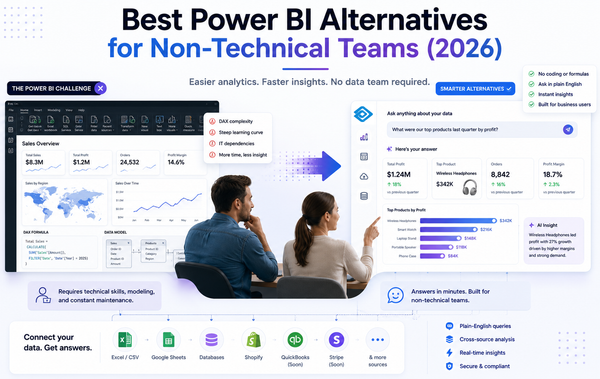
Your sales data is in Shopify. Your expenses are in QuickBooks. Your ad spend lives in Google Ads. And someone just asked you how Q1 actually went.
Data analysis is now the top generative AI use case among AI-adopting small and mid-sized businesses (SMBs), ahead of content generation and chatbots (per 2024 reports from the SBA Office of Advocacy, U.S. Chamber of Commerce, and Salesforce). But a 2024 Small Business Institute Journal study adds the catch - most SMBs know analytics tools exist but lack the in-house expertise to use them.
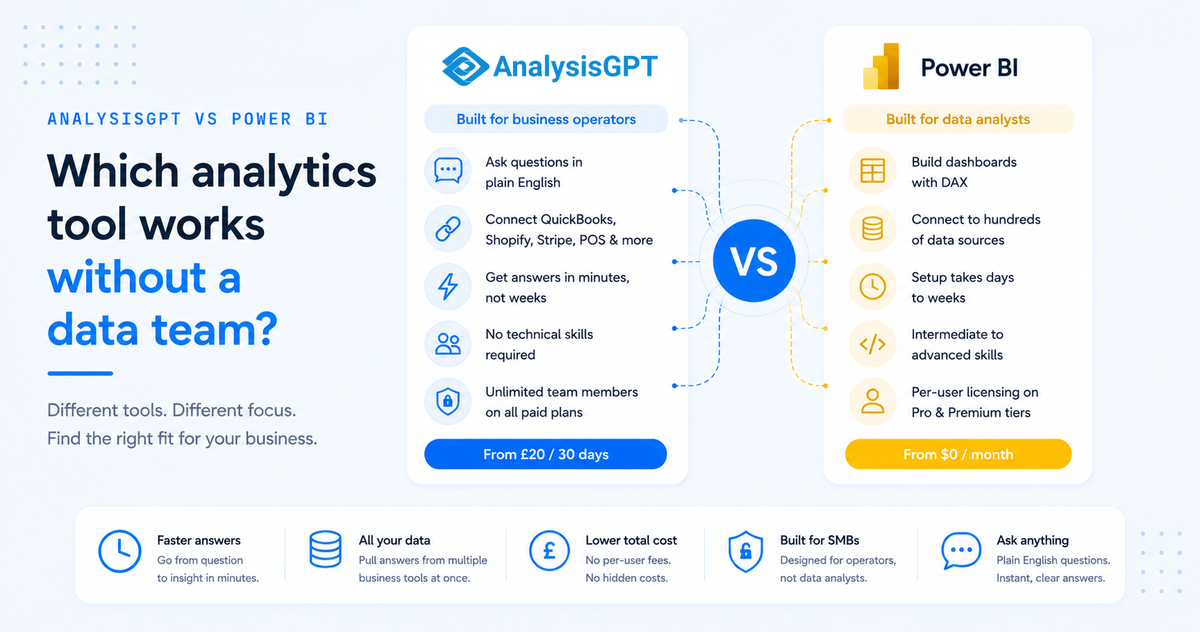
Power BI is Microsoft's enterprise business intelligence (BI) platform, built for data analysts and BI teams. AnalysisGPT is a conversational analytics platform built for operators without one. What follows compares both tools across setup time, skill, pricing, integrations, and output - for an SMB operator who needs answers, not a dashboard project.
Key takeaways
- Power BI is built for a different user. It assumes someone on staff can model data, write DAX, and maintain dashboards.
- AnalysisGPT is built for business operators. Ask questions in plain English; get answers from your connected tools.
- Time to first insight differs significantly. AnalysisGPT returns answers in minutes. Power BI typically takes days or weeks of setup.
- The biggest Power BI cost for SMBs isn't the license. It's the time, training, and ongoing maintenance a non-technical team must absorb.
- The right tool depends on staffing — Power BI fits teams with a BI analyst; AnalysisGPT fits teams without one.
At-a-glance comparison
What is AnalysisGPT?
AnalysisGPT is a conversational analytics platform built for non-technical small business operators. Type a question in plain English - "What were my top-selling products last month?" or "How does this quarter's revenue compare to last year?" - and get an answer pulled directly from your business data. No formulas, no dashboard builds.
Two ways to start. Connect live tools like QuickBooks, Shopify, Stripe, or a POS system, and AnalysisGPT pulls data across them to answer questions that would otherwise require manual exports. Or upload a CSV or Excel file and start asking questions immediately.
The platform assumes the person asking the question is the person running the business. All paid tiers include unlimited team members, unlimited queries, and AI-powered predictive analytics.
What is Power BI?
Power BI is Microsoft's enterprise business intelligence platform, designed for data analysts and BI teams to build interactive dashboards, reports, and visualizations for monitoring performance across departments.
Power BI connects to hundreds of data sources - Excel files, SQL databases, cloud services like Salesforce and Google Analytics. Its data modeling layer, Power Query, lets analysts clean, transform, and shape data before building reports. Its formula language, DAX (Data Analysis Expressions), gives analysts precise control over calculations. Results include highly customizable dashboards, drill-down exploration, and tight integration with Excel, Teams, and SharePoint.
Power BI Desktop is free to download and use locally on Windows. Sharing reports requires a Pro license ($14/user/month) or higher. Gartner's 2024 and 2025 Magic Quadrants for Analytics and BI Platforms have tracked a broader market shift toward conversational, natural-language interfaces, reflecting persistent accessibility gaps with traditional dashboards for non-technical users.
How AnalysisGPT and Power BI compare
Five dimensions separate these tools in practice. For an SMB operator without a data team, the first two - setup speed and ongoing skill requirements - tend to determine whether a tool actually gets used.
Time to first insight
Time to first insight favors AnalysisGPT by weeks. AnalysisGPT returns answers in minutes after a CSV upload or live tool connection; Power BI needs days to weeks of data modeling before the first dashboard is useful. For teams without a BI analyst, the gap tips the decision.
AnalysisGPT: Upload a CSV or Excel file and ask your first question within minutes. Live tools like QuickBooks or Shopify connect through a guided flow - most integrations take under 10 minutes.
Power BI: Importing data requires choosing the right connector, configuring the connection, then cleaning and shaping data in Power Query - a step that assumes familiarity with data transformation. A first meaningful dashboard takes days to weeks, and sharing it requires a paid Pro or Premium license for every viewer.
Technical skill required
Technical skill required differs sharply between the two. AnalysisGPT has a zero-skill floor - plain-English questions work without formula languages. Power BI requires working knowledge of DAX (Data Analysis Expressions) for day-to-day reports and Power Query's M language for data pipelines.
AnalysisGPT: The interface interprets plain-English questions against your connected data. No formula language, no query syntax, no dashboard maintenance.
Power BI: DAX is comparable in complexity to advanced Excel formulas. Power Query uses its own M language. Keeping dashboards accurate also requires ongoing model maintenance - updating relationships, adjusting calculations, refreshing data sources.
The 2024 Small Business Institute Journal study confirms the pattern at scale: the primary barrier to SMB analytics adoption is insufficient in-house expertise. A founder or ops lead wearing multiple hats hits those requirements as a recurring bottleneck.
Cross-system data access
Cross-system data access favors AnalysisGPT out of the box. AnalysisGPT's native connectors (QuickBooks, Shopify, Stripe, POS) handle cross-system queries automatically. Power BI connects to hundreds of sources but requires manual data modeling - defining relationships, matching keys, resolving conflicts - before cross-system answers work.
AnalysisGPT: Ask "How did my Shopify revenue compare to my QuickBooks expenses last quarter?" and get a single answer. Adding a data source means connecting it through the platform, not rebuilding a model.
Power BI: Breadth is genuinely impressive - hundreds of databases, APIs, and cloud services. But combining sources requires building a data model: defining relationships, matching keys, and resolving conflicts between systems. Routine for an enterprise data team; a project in itself for an SMB operator without one.
Visualization and reporting depth
Visualization is Power BI's strongest dimension, and that deserves direct acknowledgment.
Power BI: Highly customizable dashboards with dozens of built-in chart types and a marketplace of custom visuals. Drill-down interactions, conditional formatting, and pixel-level layout control. Teams can embed reports, share via Microsoft Teams, and schedule automatic refreshes. Power BI is hard to beat for polished, presentation-ready analytics with precise visual control.
AnalysisGPT: AnalysisGPT auto-generates charts and visual summaries as part of its conversational answers. Real-time dashboards come included on all paid tiers. The trade-off is intentional: less visual control in exchange for zero configuration.
Teams whose priority is custom dashboards with drill-downs will find Power BI the stronger fit. AnalysisGPT handles the simpler case well - a clear visual answer to a specific question.
Pricing
Pricing differs in both structure and scale. AnalysisGPT uses per-workspace pricing (£20-£90/30 days) with unlimited team members. Power BI uses per-user pricing ($14-$24/user/month) plus enterprise capacity tiers - costs scale linearly with team size. AnalysisGPT pricing is listed in GBP (£) and Power BI pricing in USD ($); both are kept in their published currencies below.
AnalysisGPT pricing
Four tiers, all billed every 30 days. Every paid tier includes unlimited team members - an unusual feature at this price point.
- Trial Plan - £0: Full platform access with all Pro features. Upgrade any time.
- Excel Plan - £20/30 days: Excel and CSV-based analysis. Unlimited team members and queries.
- Pro Plan - £90/30 days: Adds database connections, real-time dashboards, and AI-powered predictive analytics. Unlimited team members.
- Enterprise Plan - Contact sales: Private cloud or on-premise deployment, advanced role-based access control, and unlimited custom AI agents.
Power BI pricing
Power BI's pricing scales per user and per capability tier.
- Free Account - $0/month: Power BI Desktop for individual Windows use. Local analysis only, no sharing.
- Power BI Pro - $14/user/month (billed yearly): Publish and share reports. Up to eight scheduled refreshes per day. Included with Microsoft 365 E5. 1 GB model memory per dataset.
- Power BI Premium Per User (PPU) - $24/user/month (billed yearly): Pro plus 100 GB model memory, 48 refreshes per day, advanced AI features, and XMLA endpoint access.
- Power BI Embedded / Microsoft Fabric Capacity: Variable pricing for embedded analytics or Microsoft's full data platform.
The per-user model means costs scale linearly with team size. A 20-person team on Pro runs $280/month before anyone builds a single dashboard.
When to choose AnalysisGPT
AnalysisGPT is the better fit when your constraint is expertise, not ambition.
- You don't have a data analyst on staff and need answers from your business data without learning a technical skill.
- Your data lives across several SMB tools - QuickBooks, Shopify, Stripe - and you want cross-system answers without a data model.
- Speed matters more than visual polish. A clear answer in two minutes beats a custom dashboard in two weeks.
- Your team needs access without per-seat costs. Unlimited team members on every paid tier.
- You want to start today. Upload a file or connect a tool - no training, no project plan.
When to choose Power BI
Power BI is the better fit when your organization has the technical resources to match its capabilities.
- You have a data analyst or BI specialist who can build and maintain dashboards.
- You need highly customized, interactive dashboards with drill-downs, conditional formatting, and precise visual control.
- Organizations running on the Microsoft ecosystem - Excel, Teams, SharePoint, Azure - benefit from tight integration.
- You're embedding analytics into a product. Power BI Embedded supports white-labeled reports inside your own application.
- Your data infrastructure is complex. SQL databases, large-scale pipelines, or enterprise compliance requirements are what Power BI's modeling layer is built for.
Try AnalysisGPT free
SMB operators who want business answers without a dashboard project can start on AnalysisGPT's Trial plan at no cost. Connect your tools or upload a file, ask a question in plain English, and see what your data says.
FAQs
Is AnalysisGPT easier to use than Power BI?
Yes. AnalysisGPT connects to your existing tools and lets you ask questions in plain English within minutes. Power BI typically requires days or weeks of setup - data modeling, learning DAX (Data Analysis Expressions), and building report layouts. Teams without a dedicated analyst see a significant gap in time-to-first-insight.
Can AnalysisGPT replace Power BI?
Small and mid-sized teams that need fast, conversational answers from tools like QuickBooks, Shopify, Stripe, or POS systems will find AnalysisGPT covers most of what they'd use Power BI for. Power BI still has an edge in highly customized enterprise dashboards and complex data models maintained by a dedicated BI team.
Which GPT is best for data analysis?
Several AI tools offer data analysis - ChatGPT's Code Interpreter, Google's Gemini, and AnalysisGPT. ChatGPT and Gemini work well for one-off analysis of uploaded files. AnalysisGPT is designed specifically for ongoing business analysis with live connections, so it fits teams that need recurring answers from operational data.
Is ChatGPT good with Power BI?
ChatGPT can help write DAX formulas, troubleshoot Power Query steps, and explain error messages, which makes it a useful companion for Power BI users. It doesn't connect directly to Power BI datasets or run queries against them. You still need to copy data or context into the chat manually, and you still need enough Power BI knowledge to apply what ChatGPT gives you.
Does AnalysisGPT work with multiple data sources?
Yes. AnalysisGPT connects natively to tools like QuickBooks, Shopify, Stripe, POS systems, and databases through API integrations. Questions can pull from more than one source at a time - for example, combining Shopify sales data with QuickBooks expense data to see profit by product line. No CSV exports or data warehouse required.
Which is more affordable for a 20-person team?
Power BI Pro costs $14 per user per month, so a 20-person team pays $280 per month before the time and expertise needed to build and maintain reports. AnalysisGPT uses team-based pricing rather than per-seat, which tends to cost less for smaller teams that want everyone to have access. Factor in the hidden cost of Power BI - hiring a BI specialist or losing hours to self-service learning curves - and the gap widens.