

Deciding between AnalysisGPT and Julius AI is less about which AI-powered analytics tool is “better” and more about which workflow fits the problem you’re trying to solve. Both tools let you ask questions about data in plain language, but they’re built for different users and types of analyses.
AnalysisGPT is a conversational analytics platform designed for non-technical small and medium-sized business (SMB) operators who need business answers across multiple data sources. Julius AI is an analytics platform built for users exploring specific files and datasets in a notebook-style workspace that supports large uploads.
This guide compares both tools across the dimensions that matter most for business decision-makers: workflow, data connectivity, and security models.
Key takeaways
- Core difference: AnalysisGPT answers business questions across multiple connected systems. Julius AI focuses on deep analysis of one dataset at a time.
- Best for: AnalysisGPT fits teams that need cross-system answers without SQL. Julius AI fits teams doing deep, step-by-step analysis on one dataset at a time.
- Key dimensions: AnalysisGPT emphasizes cross-source answers and a metadata-only security architecture. Julius AI emphasizes iterative notebook analysis, large 32GB uploads, and broad connectors.
- Pricing: Both tools have tiered plans and a free way to test the platform.
AnalysisGPT vs. Julius AI at a glance
| Feature | AnalysisGPT | Julius AI |
|---|---|---|
| Primary use case | Business answers across multiple systems | Deep analysis of a specific file or dataset |
| Target user | Business teams that need answers across multiple systems | Business teams and analysts who want a workspace for multi-step analysis on specific datasets |
| Natural language queries | Yes: Chat-first workflow built around quick Q&A | Yes: A workspace designed for multi-step analysis |
| Data source connections | Databases plus Excel/CSV upload: SMB tool connectors are in progress (Shopify, Quickbooks, and Square coming soon) | Databases plus file uploads: Also connects to Google Drive, Google Ads, and Meta Ads |
| Cross-source analysis | Designed for cross-source questions (answers can span connected systems) | Focused on one dataset at a time |
| Data security model | The model sees only metadata (table and column details), not the underlying data: Queries run with read-only access | Analysis is generated from the data you upload or connect; review current privacy and data handling details before deciding |
| Excel/CSV upload | Yes (drag-and-drop upload) | Yes (supports large uploads up to 32GB) |
| Pricing | Free file upload; Pro from £90/month; Enterprise call for pricing | $0–$375/month (billed annually); Enterprise call for pricing |
| Best for | SMB teams with data spread across different systems and need answers in one place | Teams doing repeatable, exploratory analysis on individual datasets |
What is AnalysisGPT?
AnalysisGPT is a conversational analytics platform built for the tools small businesses already use, including Excel files and CSV uploads. It delivers data insights without ETL pipelines by answering questions directly from connected sources, which helps when data is spread across multiple business tools, and you need quick answers.
Once your data sources are connected, the platform allows you to:
- Ask conversation-style questions in the chatbox interface.
- Get answers, charts, and analysis back instantly.
- Work without using Structured Query Language (SQL), extract, transform, load (ETL) pipelines, or a dedicated data team.
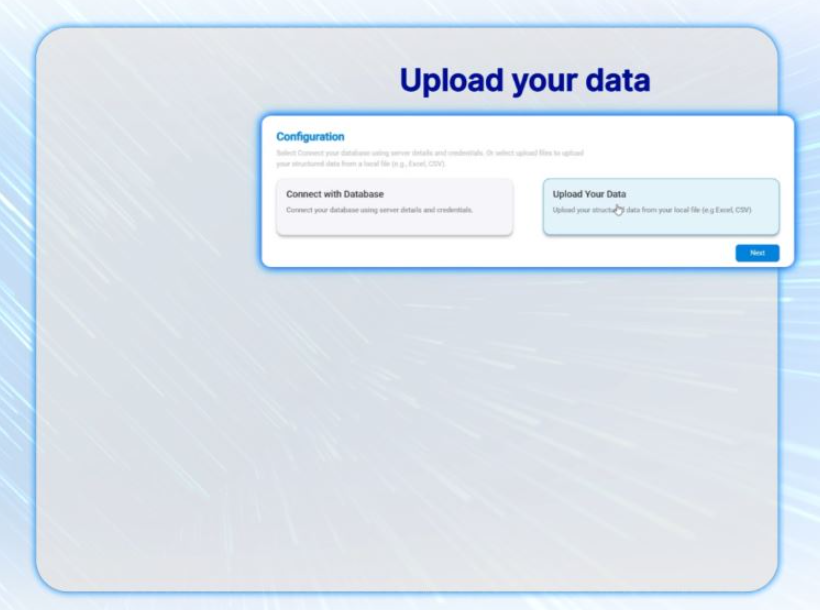
AnalysisGPT offers two entry data connection options: Users can connect directly to databases for deep analysis or use the drag-and-drop Excel or CSV upload for a quick analysis. Operational tool connectors like Shopify and Square are coming soon!
This dual approach works whether you’re solving a one-off reporting task or building a dashboard your whole team can rely on.
What makes AnalysisGPT’s architecture different is how it handles your privacy, which matters for businesses handling sensitive financial or customer information. It’s designed to keep your underlying data out of the AI layer during analysis. Queries are built from column fields and table metadata and run with read-only access against your source systems.
What is Julius AI?
Julius AI is a data analysis tool for exploring files and datasets, known for turning spreadsheets into charts and insights quickly. The platform has more than two million users and raised a $10 million seed round led by Bessemer Venture Partners in July 2025.
Julius AI allows you to:
- Upload CSV and Excel files, including large uploads up to 32GB.
- Connect to databases such as Postgres, BigQuery, and Snowflake.
- Ask questions and generate charts, summaries, and repeatable analyses using a chatbot interface.
The notebook-style workflow fits exploratory, iterative analysis. You can ask an initial question, and then refine subsequent queries based on the data you uncover. This process allows you to work through a series of connected questions in one workspace to build a complete, documented research trail.
It’s a strong fit when you want to save charts and results as a repeatable notebook you can rerun on the next upload or export.
Julius AI generates results from the data you upload or connect. If you work with sensitive financial, customer, or operational data, it’s worth reviewing Julius’s current privacy and data handling details before deciding whether that approach fits your requirements.
How AnalysisGPT and Julius AI compare
Both tools use AI to make data analysis more accessible, but they diverge on who they serve, what they connect to, and how they handle your data. The right choice depends on where your data lives, who needs answers, and how much structure your team wants around analysis.
Natural language queries and ease of use
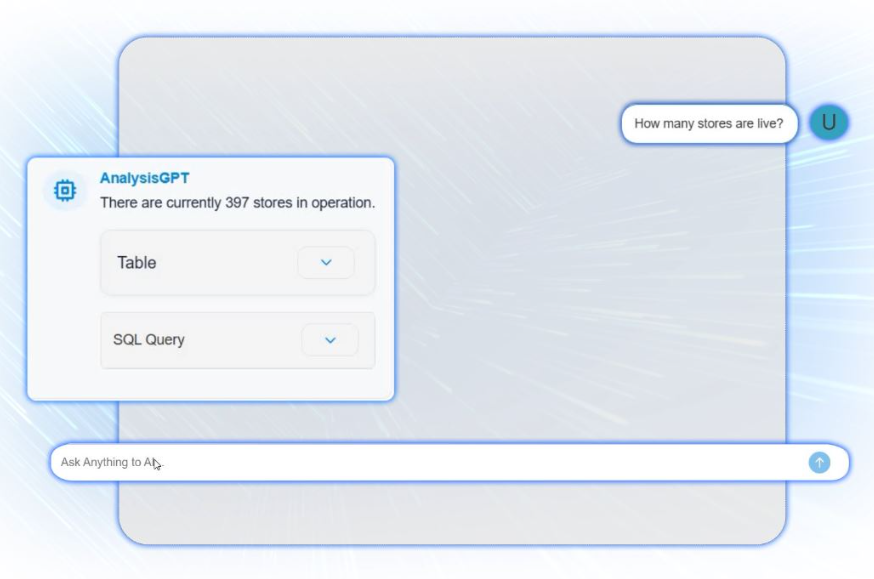
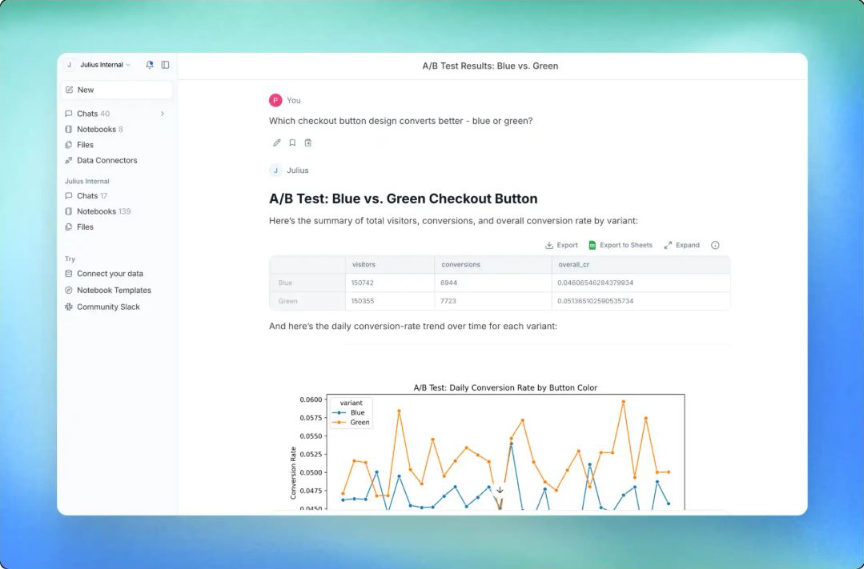
Both tools provide a conversational interface where you can ask questions in plain language. The difference is the workflow: AnalysisGPT is a chat-first flow for quick Q&A, while Julius supports multi-step analysis where questions and outputs build on each other.
AnalysisGPT
- Chat-first interface that keeps setup light for non-technical operators.
- Works well for mixed-skill teams, including people who have never opened a SQL editor or a Jupyter notebook.
- Good fit for direct questions, such as “What was our highest-margin product last week?”
Julius AI
- Notebook-style format for exploring a file or dataset over multiple steps.
- Strong fit when analysis is iterative, and follow-up questions build on earlier results.
- Works well for analysts or data-savvy operators who want to chain analyses together and create repeatable workflows.
Takeaway
AnalysisGPT is easier to use when the goal is quick answers with minimal setup. Julius AI is easier to use when the goal is step-by-step analysis on a specific file or dataset.
Data source connections and integrations
Both AnalysisGPT and Julius AI support the two most common starting points for SMB teams: connecting to a database and working from spreadsheets. The differences show up in which systems each tool prioritizes and what that implies about the workflows they’re built around.
AnalysisGPT
- Connects to databases, plus supports drag-and-drop Excel/CSV upload as a lower-friction entry point.
- Prioritizes SMB operational systems (accounting, ecommerce, POS, CRM) over data infrastructure.
- In the works: Shopify and Square integrations coming soon, with QuickBooks and Stripe currently being evaluated for future integrations.
Julius AI
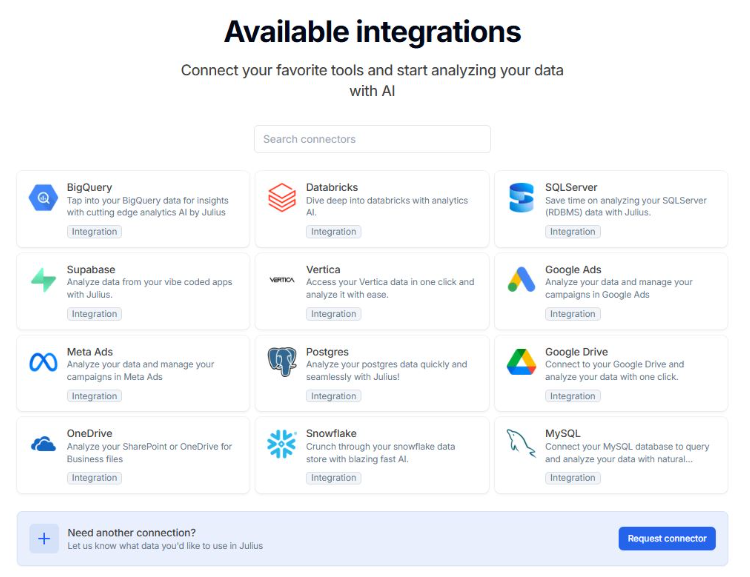
- Connects to databases, including Postgres, BigQuery, and Snowflake.
- Supports file uploads up to 32GB for large exports and datasets
- Connects to cloud storage (Google Drive) and ad platforms (Google Ads, Meta Ads).
Takeaway
AnalysisGPT is oriented toward connectors for SMB operational tools like accounting, ecommerce, POS, and CRM, with Shopify and Square coming soon. Julius AI’s connectors skew toward data warehouses, cloud storage, and ad platforms, which fit teams already working inside those environments.
Cross-source analysis
Its ability to analyze data from multiple sources is a core strength of AnalysisGPT, which is built to answer questions that pull from more than one connected system. Julius AI is built for deep analysis of one dataset at a time, whether that’s an uploaded file or a connected database.
AnalysisGPT
- Built for cross-source analysis across multiple connected data sources.
- Answers questions that pull from more than one data system without requiring manual spreadsheet work to match records across files.
- Tracks the full customer journey by linking data from separate tools, such as connecting marketing spend to final revenue in your accounting system.
Julius AI
- Best suited for single-source analysis on one file or one connected database at a time.
- Strong fit when you want to explore a specific dataset in a notebook-style, multi-step workflow.
- Not designed to unify multiple business systems into one query across sources.
Takeaway
For SMB teams dealing with data fragmentation across business tools, cross-source analysis is the capability that matters most. If your answers need to pull from more than one system, AnalysisGPT is the better fit.
Data security and privacy
AnalysisGPT and Julius AI handle data security differently based on how much information reaches the AI model during analysis.
AnalysisGPT uses a metadata-only architecture to ensure your raw data stays in its original systems rather than being sent to the AI model. Julius AI processes analysis by directly accessing the data you upload or connect, allowing for deeper visualization and manipulation.
AnalysisGPT
- Model isolation: The large language model (LLM) receives only column fields and table metadata (table names and relationships), not the raw data.
- Query formatting: The LLM uses schema information to format a query, which is then executed via a read-only connection.
- Data remains in place: User data never leaves its systems and is never sent to the model. AnalysisGPT is ISO 27001, ISO 42001, SOC2 Type II, GDPR and UK Cyber Essentials compliant.
Julius AI
- Compliance claims: Julius states it’s SOC 2 Type II and GDPR compliant.
- Environment controls: Julius documentation describes per-user sandboxed environments and user-controlled deletion.
- Training policy: Julius states customer data isn’t used to train its AI models.
Takeaway
If your policy prohibits underlying data from being sent to an AI model, AnalysisGPT is designed for that constraint. For either tool, review current privacy and data handling policies to confirm retention, access controls, and deletion meet your requirements.
Pricing
Pricing is fairly easy to compare for Julius AI because the tiers are published on its website. For AnalysisGPT, you can start free with files, then confirm paid pricing based on how you plan to connect data and deploy the tool.
AnalysisGPT
- Free tier: £0
- Pro: £90/month for the first three months, then £200/month; unlimited team members
- Enterprise: Call for pricing (monthly billing; role-based access control; private cloud or on-premise options)
Julius AI
- Free tier: $0
- Pro: $37/month (billed annually): One seat included
- Business: $375/month (billed annually): Ten seats included
- Enterprise: Call for pricing
Before committing, check the current pricing for both tools on their websites, since tiers and rates can change.
When to choose AnalysisGPT
AnalysisGPT is the right choice if you need clear answers across the tools you already use to run your business, without adding a new analytics workflow. It’s a strong fit for the following needs:
- Non-technical team: You need answers without a data team or SQL skills.
- Fragmented data: Your numbers live across accounting, e-commerce, CRM, and spreadsheets.
- Cross-source questions: You need answers that pull from more than one system for the same question.
- Simple workflow: You want to ask questions in plain language without building dashboards or working in notebooks.
- Data privacy: You want your underlying data to stay in your systems, not be processed by an AI model.
If your day-to-day problem is, “Where’s the real number?” across multiple data sources, AnalysisGPT is a practical fit. It gives one consistent answer across systems, without spending hours exporting files or maintaining reporting workarounds.
When to choose Julius AI
Choose Julius AI if your work is centered on exploring a specific file or dataset in depth, and you want a workspace that supports step-by-step analysis. It’s a good fit in situations with the following needs:
- File analysis: You want to analyze spreadsheets, CSV files, or database exports quickly.
- Notebook workflow: You prefer a notebook-style format and want to build repeatable analyses over time.
- Large uploads: You work with large files, including uploads up to 32GB.
- Dataset focus: Your primary need is understanding one dataset at a time, not cross-system business questions.
- Scheduled reports: You want automated reports delivered on a schedule through email or Slack.
If your work starts with a file or export and the goal is to explore it, test ideas, and refine the analysis over a few steps, Julius AI is the logical fit. It’s especially useful when you want a repeatable notebook workflow you can revisit, update with new data, and share as outputs.
FAQs
What’s the main difference between AnalysisGPT and Julius AI?
AnalysisGPT is built for questions that pull from multiple connected systems, like accounting, ecommerce, CRM, and spreadsheets. Julius AI is built for deep analysis of one dataset at a time, usually through a notebook-style workflow.
Can both tools connect to databases?
Yes. AnalysisGPT supports database connections, including MySQL, PostgreSQL, Snowflake, and SQL Server. Julius AI supports databases including Postgres, BigQuery, and Snowflake.
Which tool is better for non-technical users?
AnalysisGPT is a better fit for quick answers with minimal setup because it connects directly to your existing business tools to pull live data, rather than requiring you to manually export, clean, and upload files for every analysis.
How does data security compare between AnalysisGPT and Julius AI?
AnalysisGPT’s LLM receives only column fields and table metadata, formats the query, and then executes it against the database with read-only access. User data never leaves its systems and is never sent to the model.
Julius AI generates analysis from data you upload or connect, so it’s best to confirm what’s processed during analysis, what’s retained, and what access and deletion controls apply.
For both, review current privacy and data handling policies before committing.
Is AnalysisGPT or Julius AI better for small businesses?
It depends on the work. For fragmented tools and questions that pull from more than one system, AnalysisGPT is often the better fit. For fast, repeatable analysis on a single file or dataset, Julius AI is likely a better match.
Can I try both tools for free?
Yes. Julius AI has a free plan. AnalysisGPT offers free Excel/CSV upload, so you can test the workflow before moving to paid plans for database connections and team features.
Try AnalysisGPT free
If you're running a small or mid-sized business and comparing AnalysisGPT with Julius AI, the key question is what you need the tool to do day to day. If you need to pull from multiple business systems, and you don’t have a data team or technical skills, AnalysisGPT is built for that workflow.
Upload an Excel file and ask your first question in minutes.