You sat through a Tableau demo, and 10 minutes in, you were already lost. It has too many features, too much complexity, and no clear link to how it actually helps your business. Or maybe you skipped the demo and went straight to the pricing page, which was enough to send you looking elsewhere.
Tableau is a powerful business intelligence and analytics tool, but it serves enterprise teams with dedicated data analysts, generous IT budgets, and months to spare on implementation.
Most lists of Tableau alternatives assume you have a dedicated data team and a budget for implementation consultants. This guide is different. We evaluate each tool through an SMB lens: what actually works for a team of five to 50 people, with no data engineer support, and a handful of data sources they just need to make sense of.
Note: AnalysisGPT is our platform, and it appears first. The remaining tools are assessed based on public information, user reviews, and hands-on evaluation.
Key takeaways
- Many BI tools assume you have a data team, a data warehouse, or technical skills that most SMB teams don't have.
- The right tool depends on where your data lives, like QuickBooks and Shopify.
- Ease of use and time-to-value matter more than features. You need a tool that your team will actually adopt and use.
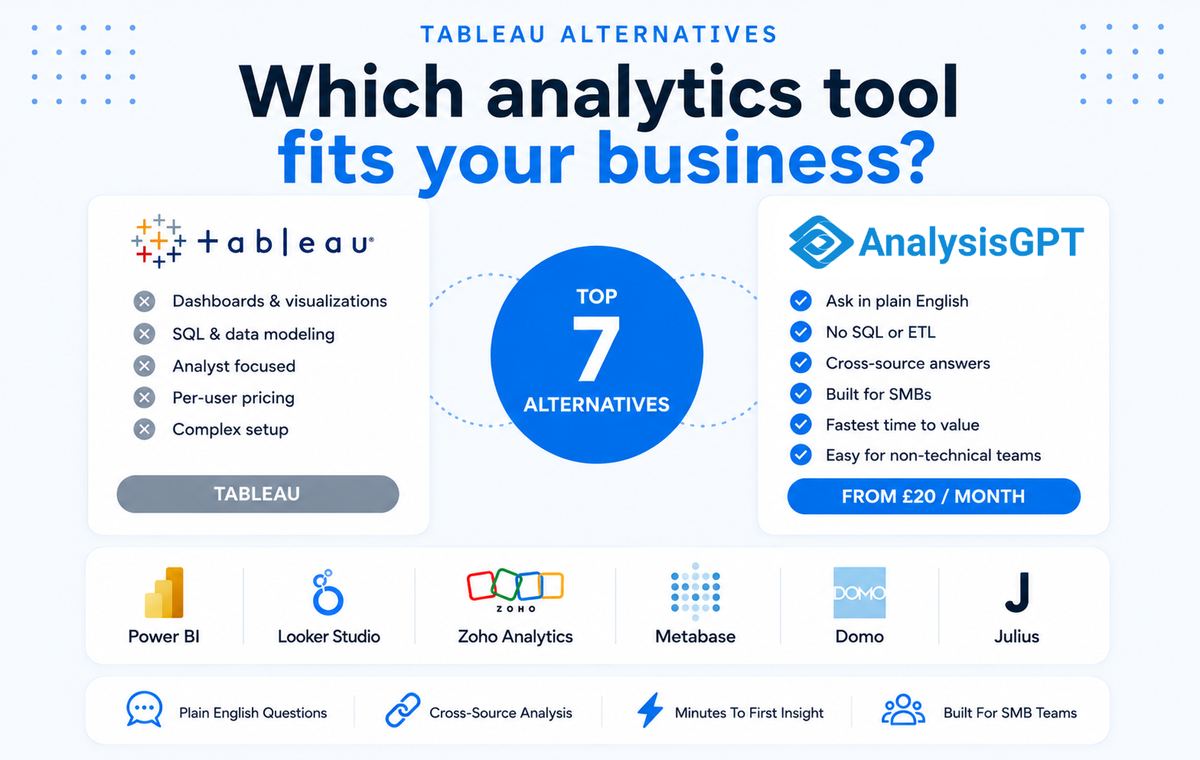
Tableau alternatives at a glance
| Tool | Best for | Data access | Technical skill needed | SMB integrations | Starting price / next lowest price |
|---|---|---|---|---|---|
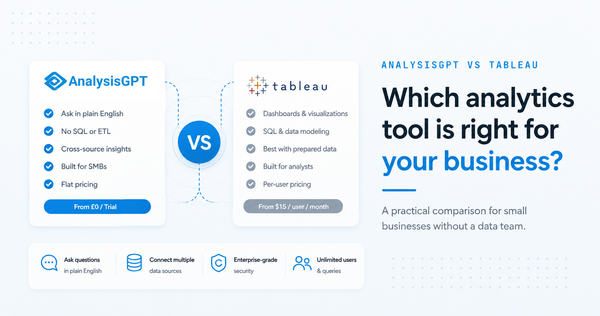
| AnalysisGPT | Non-technical SMB teams needing cross-source answers | Plain language questions | None | QuickBooks, Shopify, Stripe, and databases | Free 30-day trial / from £30 ($34) per month |
| Power BI | Microsoft-native teams with some data skills | DAX formulas, drag-and-drop | Moderate | Microsoft ecosystem | Free (limited) / from $14 per user per month |
| Looker Studio | Google-native teams on a budget | Drag-and-drop connectors | Low-moderate | Google Workspace | Free / $9 per user per project |
| Zoho Analytics | SMBs that want visual dashboards | Drag-and-drop builder | Low | Zoho ecosystem | Free / from $48 per month |
| Metabase | Technical teams that want open source | SQL optional, point-and-click | Low-moderate | Self-hosted, any database | Free (open source) / from $100 per month |
| Domo | Mid-market teams that need many connectors | Dashboard builder | Moderate | 1,000+ connectors | Custom pricing |
| Julius | Individual analysts exploring datasets | Chat interface, notebooks | Low | File upload, databases | Free / from $33 per month |
How to evaluate a Tableau alternative for your small business
To evaluate an analytics or BI tool for your SMB, run through these five questions. They will reveal whether the tool will truly work for a small team.
Does it connect to the tools your team already uses?
SMBs use tools like QuickBooks, Shopify, Stripe, HubSpot, Xero, Google Sheets, and Square. If a platform doesn’t support these integrations or requires a data warehouse, it’s not built for your team.
Ask: “Can I connect my accounting and ecommerce tools directly, or do I need middleware (software that sits between two other systems and helps them communicate and work together)?”
Can non-technical team members actually use it?
You need a tool with an interface that matches your team’s skills. Tools that let you build your own dashboard may seem beneficial upfront, but they still require the skills to build and maintain it. Others, like notebook-style interfaces, assume you’re comfortable with coding.
But with question-based workflows, anyone can type, “What were our top-selling products last month?” and get an answer.
Ask: “Could our operations lead get an answer from this tool in their first session, without training?”
What does it cost at your team’s scale?
Pricing often looks simple at first, but costs can increase when you factor in more users or features, hosting fees, and maintenance time costs. Per-user pricing seems affordable at three users, but becomes expensive at 15. Free tiers often don’t include key features, like data sources, refresh rates, and sharing. And open source tools are “free” until you account for hosting and maintenance time.
Ask: “What will this cost us when 10 people need access, and we have five data sources connected?”
How fast can you get value from it?
Analytics tools are only valuable if your team uses them, and a long setup process is often the first reason they don’t. For an SMB, the right tool should deliver a useful insight within the first hour. If the “getting started” guide is longer than a page, or if you can’t connect your own data on day one without technical help, that’s a sign that the tool won’t serve a small business owner wearing many hats.
Ask: “How long from sign-up to our first real business answer using our actual data, not a demo dataset?”
Does it handle cross-source questions?
SMBs get real value when they can connect sales data (Shopify) with financial data (QuickBooks) and marketing data (Google Ads). When a tool can handle cross-source questions, you get more complete and thorough answers. Many tools support integrations, but still silo your data (i.e., they display data from each tool separately). Find a tool that lets you combine data so you can ask a single, cross-source query.
Ask: “Can I ask a question that pulls from two or more different data sources in one answer?”
The 7 best Tableau alternatives for small businesses
The tools below cover a range of use cases, team sizes, and budgets. Each section includes a “Works best for” line, so you can quickly identify which ones are worth a closer look.
AnalysisGPT
SMBs don’t have unlimited hours or a data team to dedicate to analyzing data, but you still need to make sense of it. Enterprise analytics tools exist, but which analytics tool works best for the 50-person company with five data sources?
AnalysisGPT is a cloud-based, AI data analytics platform that lets you ask plain-language questions about your data.
Works best for: Small, non-technical teams who need cross-source answers about their data
AnalysisGPT at a glance:
- Cross-source analysis: Ask one question, get an answer that pulls from multiple data sources
- Time-to-value in minutes: Connect a source or drop in a CSV
- Built for non-technical users: No coding knowledge needed
- Data stays in your hands: AnalysisGPT never touches actual data
There are no SQLs (structured query language), ETLs (extract, transform, load), notebook-style workflows, or dashboards to build. You just upload your Excel or CSV file (or connect to a source), ask questions in plain language, and get insights through a chat-like interface.
How it works: https://analysisgpt.ai/business-analysis
Connect: Link your data sources, including databases (via credentials), or upload Excel/CSV files (via drag-and-drop)
Ask: Type your business questions in the chat (e.g., “What were my top five products by margin last quarter?”)
Get answers: You get insights, charts, and analysis instantly
Data security model
Many AI query tools, like ChatGPT, work by sending your data to the model that processes it. The model reads it, evaluates it, and returns an answer. That means your data leaves your system and gets exposed to a third party.
AnalysisGPT works differently. It keeps your data within your own systems. The model only receives column names and table metadata: just enough information to understand your data without accessing the underlying records. The query runs locally in read-only mode, so it can’t write, edit, or delete your data.
SMB integrations
Connect AnalysisGPT with the tools you use, like QuickBooks, Shopify, Stripe, and Square. There are no data warehouse requirements. Once connected, it answers questions by pulling data from all your sources. For example, connect QuickBooks, Shopify, and a CRM, then ask one question about data from all three.
Database connections are available with a large selection of supported databases. Each connection also comes with suggested prompts for questions, so that you can get started more quickly. For example, if you connect to Shopify, AnalysisGPT gives you a prompt like “Which customer cohort had the highest LTV?” or “Which channel drove the highest customer acquisition?”
Note: AnalysisGPT is a newer platform, and it’s worth knowing its current limitations:
- Growing integration library
- Not designed for data science workflows, notebook-style exploration, or custom ML models
- Still developing Enterprise features like SSO and audit logging
Pricing:
- 30-day free trial with full access to everything in the Pro plan
- Pro: £30 ($34)/month
- Enterprise: Contact sales
Power BI
Microsoft’s Power BI is a business intelligence and analytics platform.
Works best for: Small teams who are already in the Microsoft ecosystem and need an affordable enterprise analytics tool
Power BI has a deep integration with the Microsoft ecosystem. If you’re already using Microsoft Azure, Office, or SQL Server, you can easily connect to Power BI without creating new credentials, migrating data, or troubleshooting compatibility issues. It’s also an enterprise-grade AI analytics tool at a comparatively affordable price.
Some users say there is a steep learning curve for some of Power BI’s features, like Data Analysis Expressions (DAX), and that setup can be a challenge. It also requires data modeling knowledge, so non-technical users may find the platform too complex to use.
The Pro and Premium plans are user-based, so it gets more expensive when you add more team members.
Pricing:
- Free
- Pro: $14/user/month paid annually
- Premium: $24/user/month paid annually
- Power BI Embedded: Contact sales
Looker Studio
Previously known as Google Data Studio, Looker Studio is Google’s free dashboard and reporting tool.
Works best for: Small businesses that use Google products and want data visualizations and dashboards
You can easily connect Looker Studio to other Google products, including Google Analytics, Google Ads, Google Sheets, and BigQuery. It will automatically pull data in from those other native sources.
While it’s useful in connecting to other Google platforms, Looker Studio struggles with non-Google data sources. Users say connecting to third-party sources can be confusing, and that you may also have to pay to connect to those sources, like Adobe Analytics.
The free plan currently doesn’t have AI-powered querying. You must use Google Cloud to connect Gemini to Looker Studio, which allows you to use plain language to ask questions about your data.
Pricing:
- Free
- Pro: $9/user/project/month
Zoho Analytics
Zoho Analytics is a BI and analytics platform with an AI assistant that answers questions, identifies patterns, and provides visualizations.
Works best for: Small businesses with smaller budgets who want visualizations and dashboards
Zoho Analytics is one of the more budget-accessible platforms with SMB-friendly pricing, which scales reasonably as your team grows. The drag-and-drop builder makes it easy for non-technical users to create reports without coding knowledge. If you’re already using other Zoho products, like Zoho CRM or Zoho Books, the native integrations make it more seamless to implement into your workflows.
Zia, Zoho’s AI assistant, can answer basic data questions, but you still need to build dashboards and reports manually. And while you can connect multiple sources, asking a single question that spans all of them isn’t as seamless as more AI-native tools.
Pricing:
- Free
- Standard: $48/month paid annually; $60/month paid monthly
- Premium: $115/month paid annually; $145/month paid monthly
Metabase
Metabase is an open-source analytics platform for data exploration and dashboard creation.
Works best for: Small technical teams who want an open source solution
The open-source pricing tier is free and self-hosted, so there's no per-user licensing fee as your team grows. On this pricing plan, you own the infrastructure, which means your data never passes through a third-party vendor's servers.
Getting Metabase up and running requires technical setup and maintenance. You need someone who can configure a server, manage deployments, and troubleshoot when there’s an issue. And because the free plan has no managed hosting, the maintenance responsibility doesn't go away after setup. If your server goes down, your analytics go down with it.
Pricing:
- Open source: Free
- Starter: $100/month + $6/month per user (first five users included)
- Pro: $575/month + $12/month per user (first 10 users included)
- Enterprise: Custom pricing (starts at $20k/year)
Domo
Domo is a cloud-based analytics solution with over 1,000 source connection options.
Works best for: Mid-market teams who need lots of integrations
Domo connects to hundreds of data sources out of the box, so it’s likely that it connects to the tools your team uses. And because it's entirely cloud-based, there's nothing to install or maintain.
The dashboard interface is for the average business user, not data scientists, which means you can build and read reports without needing IT support. However, it still requires someone at your company to build the dashboard in-house and maintain it. There’s also no free tier, and you must contact the company to get pricing.
Pricing:
- Contact sales
Julius
Julius is a conversational analytics tool that lets you connect your data sources and ask questions in plain language. It returns charts and other types of reports with insights.
Works best for: Individual data analysts who want to explore their own datasets
Julius has a chat interface, so there’s no requirement to build a dashboard or configure a data model. You just ask a question about your data and get an answer. It’s comparatively affordable for an AI-native tool, making it a lower-risk option for an SMB that wants to test whether an AI analytics tool actually fits their workflow.
It has a notebook-focused workflow, so it’s better suited for one-off analysis than tracking ongoing business KPIs. It also doesn’t natively connect to the tools most SMBs run on, like QuickBooks or Shopify. If you need answers that pull from these tools, you’ll need to export them into an Excel file or CSV first.
Pricing:
- Free
- Pro: $33/month paid annually; $40/month paid monthly
- Business: $375/month paid annually; $450/month paid monthly
- Growth: $625/month paid annually; $750/month paid monthly
How to choose the right Tableau alternative
The best Tableau alternative for your specific team depends on how you work and where your data lives.
- If your team is non-technical and you use QuickBooks, Shopify, or Stripe → AnalysisGPT
- If you’re already deep in the Microsoft ecosystem and have some data skills → Power BI
- If your data lives mostly in Google tools and your budget is zero → Looker Studio
- If you want a visual dashboard builder with SMB-friendly pricing → Zoho Analytics
- If you have a technical team member and want an open-source solution → Metabase
- If you need a free, one-off analysis tool and don't need ongoing integrations → Julius
- If you need extensive integrations and have a mid-market budget → Domo
Still not sure which one fits? Here are four quick questions to help you decide:
- Does your team have anyone technical enough to configure and maintain a tool? If not, consider tools with managed hosting and simple onboarding.
- Are you already using a software ecosystem, like Microsoft, Google, or Zoho? If yes, start with the tool that’s native to that ecosystem.
- Do you need ongoing answers from live data, or occasional one-off analysis? If ongoing, pick a tool with direct source integrations rather than file-upload workflows.
- How many people need access, and what does that cost at your expected scale? Run the per-user math at 5–10 users (depending on your team size) before committing to any pricing plan.
Frequently asked questions about Tableau alternatives
- What’s the best free alternative to Tableau for small businesses?
The best free alternative to Tableau is different for every team and depends on your specific needs. Some tools to consider that have free tiers or trials are AnalysisGPT, Power BI, Looker Studio, Zoho Analytics, Metabase, and Julius. - Does Google have something like Tableau?
Yes, Google’s business intelligence tool is called Looker Studio (formerly Data Studio). - Can I use these tools without knowing SQL?
Yes, the tools on this list don’t require any technical knowledge, including SQL, and allow you to ask questions in plain language. However, some familiarity with SQL can be helpful when using a few of these tools, especially Power BI and Metabase. - Are companies moving away from Tableau?
According to user forums, like Reddit and G2, some companies are moving away from Tableau due to the high costs or technical complexities.
Finding the right analytics fit for your business
For small businesses, the right tool is the one that removes the most friction between your data and your decisions. Tableau works best for data analysts who have time to build dashboards. If that’s not your team, the best alternative is the one that meets you where you are.
AnalysisGPT connects to the tools SMBs already use: QuickBooks, Shopify, Stripe, and more. It lets you ask questions in plain English without needing to build dashboards or learn SQL. Start a free 30-day trial today.