
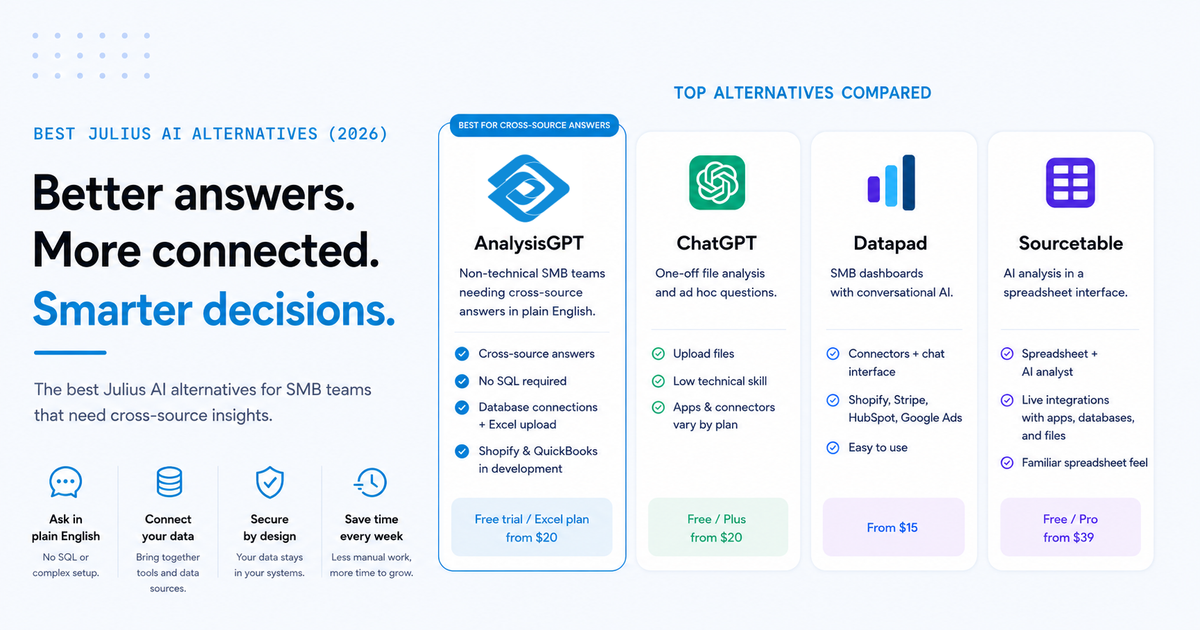
Julius AI is a strong tool for what it does: quick analysis of spreadsheets and datasets in a notebook-style workspace. And with a $10 million seed round led by Bessemer Venture Partners in 2025 and over two million users, its value is clear.
Key takeaways
- Julius AI is strong for spreadsheet analysis, but many SMBs need cross-source answers. Teams often need insights that combine data from multiple business tools.
- The best alternative depends on your workflow. Some tools focus on chat-based analysis, while others prioritize dashboards or notebooks.
- Cross-source analytics saves SMB teams time. Connected platforms reduce manual exports and reporting work.
- Simple interfaces matter for non-technical teams. Chat-first tools are often easier to adopt than traditional BI platforms.
- Pricing alone doesn’t tell the full story. Setup time, maintenance, and security also affect the real cost of a tool.
However, beyond effective spreadsheet analysis, many SMB teams have other needs that prompt them to seek out Julius AI alternatives, such as:
- The notebook-style workflow feels too technical for team members who are not data analysts.
- The tool isn’t built around the kind of operational software many SMBs rely on each day, such as QuickBooks, Shopify, and Stripe.
- The product is designed to analyze one dataset at a time rather than answer business questions that pull from two or three systems at once.
Those limits matter for SMB teams that need answers across business systems, not just analysis inside one file.
Note: AnalysisGPT is our platform, and it appears first. The remaining tools are assessed based on public information, user reviews, and hands-on evaluation.
Julius AI alternatives at a glance
How to choose the right Julius AI alternative
Choosing the right Julius AI alternative starts with two questions: where your data lives and how your team wants to work with it. Julius works well for deep analysis of individual files, but most SMB teams need something that bridges disconnected systems.
For cross-source business answers without SQL
Julius AI is better suited to analyzing one dataset at a time. That becomes a limitation for SMB teams that need cross-source analysis without SQL. A question like, “How did last month’s marketing spend affect profit margin?” pulls data from a CRM, accounting software, and an ecommerce platform all at once.
Teams with data spread across several systems usually need a tool that can return one answer from all of them, without SQL or combining reports by hand.
For non-technical teams
Julius AI’s notebook-style interface is excellent for iterative analysis, but it can feel complex for team members who aren’t data analysts.
Ask yourself a simple question when evaluating an alternative: Could your operations lead get a useful answer in the first session without specialized training? Tools with chat-first interfaces, where you type a question and get a direct answer, often create less friction for small teams than notebook or dashboard builders.
When data security is a priority
For businesses handling sensitive financial, customer, or operational data, the security model matters. Some tools process data through AI models directly. Others keep raw data out of the AI layer entirely. Review each tool’s data-handling architecture before committing, especially if you are connecting live accounting or customer databases.
When budget matters more than features
Julius AI’s pricing is clear, ranging from free tiers to $375 per month. The real cost of a tool includes more than the subscription price. A free tool that requires 40 hours of manual setup still creates real cost for a small business operator. When comparing these alternatives, look at the total cost: the subscription fee plus the time required for setup and ongoing maintenance.
The 7 best Julius AI alternatives
We reviewed the following Julius AI alternatives using the factors most relevant to SMB buyers, including workflow, data access, limitations, and overall fit. Where public pricing was available, we included it. For a broader category view, see our Best AI Analytics Tools for Small Business guide.
AnalysisGPT
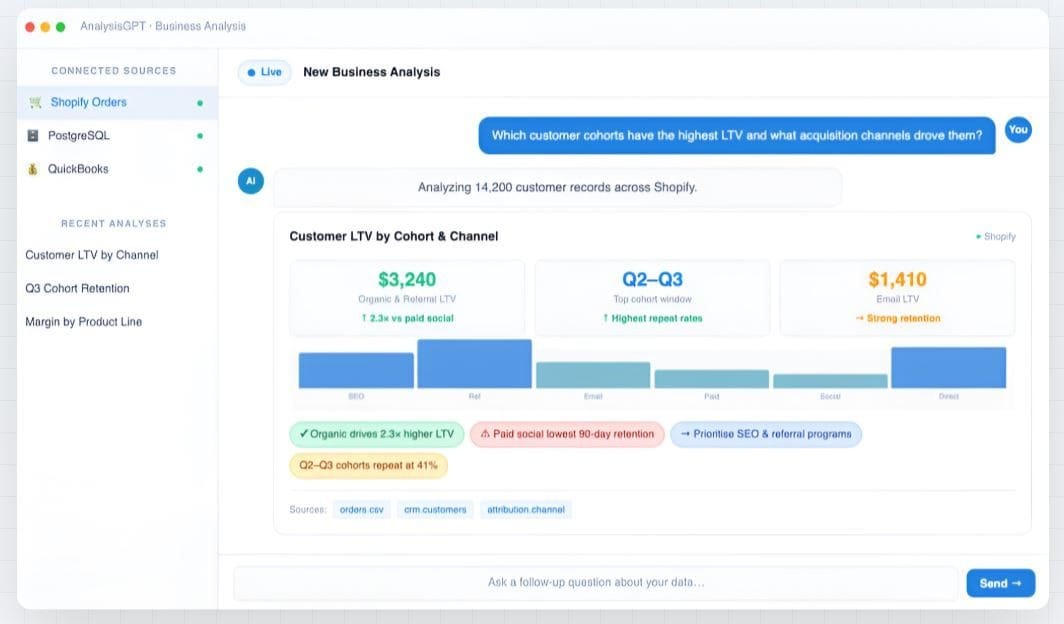
Caption: AnalysisGPT example
If you want better SMB integrations and cross-source answers, AnalysisGPT is the strongest fit. It’s a conversational analytics platform for teams that want to ask business questions in plain language across connected data sources without building dashboards or writing queries.
Who it works best for: Non-technical SMB teams that need cross-source business answers without hiring a data team or learning SQL
Where it fits best: Teams that want a simple question-and-answer workflow across connected business systems, not a notebook workspace or a traditional BI setup
The main differentiator from Julius AI is AnalysisGPT’s connected data advantage. Once your data sources are connected, you can ask one question and get an answer that spans all of your data. This makes it a better fit for teams whose data exists across several systems, rather than in one spreadsheet or one dataset at a time.
A question such as how marketing spend was affected by profit margin, or which products are selling faster than inventory can support, requires more than one source. AnalysisGPT is designed for that kind of cross-source query. For a detailed head-to-head comparison, see our AnalysisGPT vs. Julius AI guide.
AnalysisGPT’s workflow is straightforward:
- Connect data from databases or upload Excel/CSV files.
- Ask a question in plain language.
- Get an answer that pulls from multiple connected tools.
Simplicity matters for small teams because it cuts down on the reporting work that typically happens before you can run an analysis. Database and API connections keep the analysis tied to live business data.
AnalysisGPT’s setup removes a few common barriers for small businesses:
- No Structured Query Language (SQL) queries
- No Extract, Transform, and Load (ETL) pipelines
- No notebook-based workflow
It also uses a more security-conscious data model than Julius AI. The large language model (LLM) never imports raw business data. It receives only column fields and table metadata, then formats a query that runs with read-only access against the source system.
For example, a finance or operations lead could compare ad spend to actual revenue without pulling numbers from different tools. An ecommerce team could spot products that are running low while sales are picking up. A manager could see which marketing campaigns brought in customers who spent more, without exporting spreadsheets and piecing the data together by hand.
Strengths:
- Delivers cross-source answers across connected business data
- Lets teams ask questions in plain language without SQL, ETL pipelines, or notebooks
- Keeps raw data out of the LLM layer
- Offers a 30-day free trial with full access
Limitations:
- Remains a newer platform with an integration library that is still growing
- Supports database connections and Excel/CSV upload currently, while native SMB connectors such as Shopify and QuickBooks are still in development
- Does not support data science workflows, notebook-style exploration, or custom machine learning models
- Free trial
- Excel: £20 every 30 days
- Pro: £90 every 30 days
- Enterprise: Contact sales
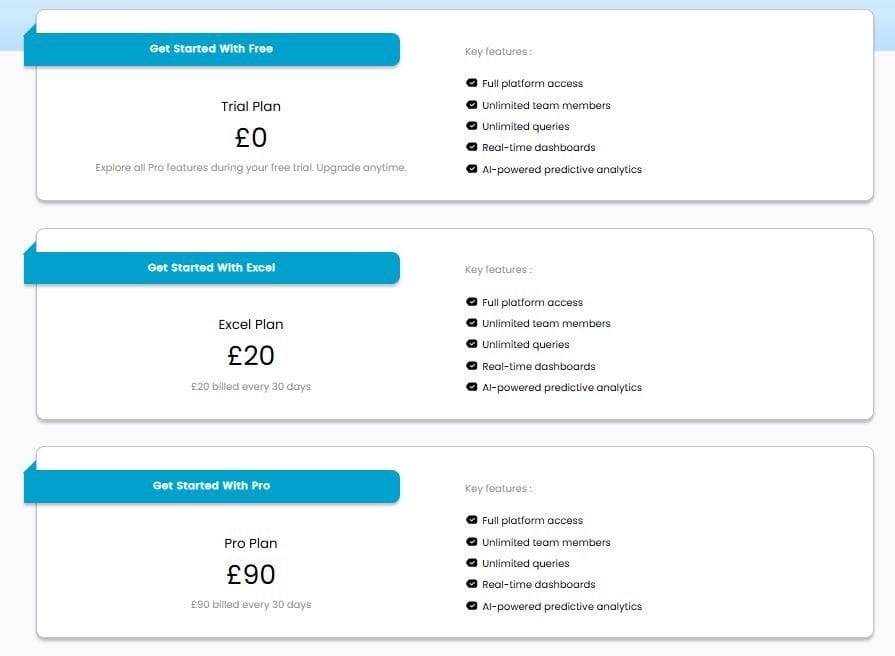
Caption: AnalysisGPT price plans
ChatGPT (advanced data analysis)
Caption: ChatGPT AI chatbot
ChatGPT is a general-purpose AI assistant that can analyze uploaded files and pasted data inside a chat interface. It summarizes information, answers questions about datasets, and creates charts from an uploaded file. OpenAI has also expanded ChatGPT’s app access, so some plans can search connected sources and work across several sources in one workflow.
Who it works best for: Small teams or solo operators who don’t know SQL and want quick answers from a spreadsheet, CSV, or pasted dataset
Where it fits best: Lightweight analysis sessions where the data is already prepared and ready to upload into chat; it’s still the tool many people try first for quick file analysis
Strengths:
- Uploads files quickly for fast analysis
- Answers plain-language questions with very little setup
- Generates summaries, charts, and exploratory analysis from a single file
Limitations:
- Fits quick file analysis better than multi-system business reporting because connected access still depends on plan, enabled apps, and setup
- Leaves security controls partly shaped by the plan, connected apps, and workspace setup
- Requires teams to prepare and upload data for many common workflows
ChatGPT pricing:
Individual plans
- Free (with ads)
- Go: $8/month
- Plus: $20/month
- Pro: $200/month
Organization plans
- Business: $20/user/month paid annually
- Enterprise: Contact sales